

hellreturn
-
Posts
2837 -
Joined
-
Last visited
-
Days Won
53
Content Type
Forums
Profiles
Events
Gallery
Downloads
Articles
Everything posted by hellreturn
-
Gameplay: - Updated weapons based on performance metrics: - Slightly increased the damage for the fiveseven to keep it on par with other pistols. - Lowered the max width of the recoil patterns for the MG's to make them better for their price point. - Lowered the spread on the Negev to be more in line with the m249. - Improvements have been made to burst fire and tapping. - Added player spawns to all maps to support up to 30 players. - Player spawns are now randomly selected from a prioritized list of spawn locations in order to better support more players per map. - Adjusted bot behavior to fix the 'antline' looking behavior. - Added support for server operators to specify tick rate with the tickrate parameter. - Physics simulation tick rate now set to be the same as the game tick interval. - Bullet tracers have had improvements made to speed, visual effect, and frequency. - Chickens added to Inferno UI - The Server Browser sorts Favorites and Lan tabs by ping rather than Tags. - The radar will no longer display an 'X' for dying players when they are not within sight of the player or player's teammate. - Weapons with a burst mode will now show which state the gun is in on the ammo panel. - Input device is now locked to whatever device launched the game session. - Updated the Kevlar and Kevlar + Helmet buy menu images. - Updated the Domination icons. Audio - Footsteps update position more often by shifting position determination to client side entity tracking. - Tuned ambient sounds in most maps Bug Fixes - Fixed a bug with individual pistol round-based achievements. They can only be earned in Classic game mode now. - Fix for changing video settings while in game sometimes causing a deadlock. - Added a popup message triggered when a player attempts to initiate a vote on a server with voting disable. - Fixed bug where player's nav area would be reported as being on the floor below them causing the radar location to be displayed incorrectly. - Fixed several UI related crash issues. - Third party map and _SE map names no longer display in the scoreboard with the #SFUI_MAP_ localization token. View the full article Click here to view the article
-
Critical fixes: + Patched a ship repair divide-by-zero crash. + Fixed a drone-related crash. + Fixed a very rare locking-beam related crash. Other fixes: + Corrected display of drone designs in the design screen. + Construction and retrofit costs now include initial drone and assault shuttle costs. + It is now possible to select systems in province creation mode once again. + No more cube for phaser weapons on drones in the design screen. + Queued station modules no longer disappear. + Fixed system info demand. + Enemy ship construction ETA is no longer visible in system icons. + Corrected the direction of trade-related government shifts. + Admiral traits no longer cause negative endurance. Other changes and additions: + Beam weapons will now fire for their entire duration and re-target on-the-fly. + Empire fleet summary no longer displays empty reserve fleets Click here to view the article
-
AMD Catalyst 12.4 Windows update is released: NEW FEATURES Windows XP support for the AMD Radeon HD 7900 Series, AMD Radeon HD 7800, and AMD Radeon HD 7700 Series - In addition to Windows 7 and Windows Vista support, Catalyst 12.4 now also introduces Windows XP (64-bit/32-bit) support for the AMD Radeon HD 7900, AMD Radeon HD 7800, and AMD Radeon HD 7700 Series Super Sampling Anti-Aliasing: Level of Detail (LOD) Image Quality enhancements - Supported on the AMD Radeon HD 7900, AMD Radeon HD 7800, and AMD Radeon HD 7700 Series - LOD Image quality enhancements have been improved when enabling Super Sample Anti-Aliasing and Adaptive Anti-Aliasing through the AMD Catalyst™ Control Center for DirectX® 10 and DirectX® 11 applications. - Applications must support in game Anti-Aliasing for the feature to work (Forced on Anti-Aliasing through the Catalyst Control Center is not supported for DirectX 10 and DirectX 11 applications) Morphological Anti-Aliasing (MLAA): Significant performance enhancements - Supported on the AMD Radeon HD 7900, AMD Radeon HD 7800, AMD Radeon HD 7700 Series, AMD Radeon HD 6000 Series, and AMD Radeon HD 5000 Series - MLAA now operates up to 80% faster than previous versions Texture filtering quality improvements - Supported on the AMD Radeon HD 7900, AMD Radeon HD 7800, and AMD Radeon HD 7700 Series - Improvements have been made to the texture filtering algorithm (for both DirectX9 and DirectX10/DirectX11 applications) to increase the quality of rendered textures, with no impact to performance RESOLVED ISSUES Resolved Issues for the Windows 7 Operating System This section provides information on resolved known issues in this release of the AMD Catalyst 12.4 software suite for Windows 7. These include: - Elder Scrolls: Skyrim : no longer hangs on single GPU configurations when used with AMD Catalyst 12.3 CAP1 and later CAP releases - Elder Scolls: Skyrim : flickering square corruption is no longer observed. - Rage : Vsync is no longer disabled after task switching. - Enemy Territory: Quake Wars : no longer crashes when launched in High Performance Mode. - Stalker – Call of Pripyat : flickering is no longer observed in trees with specific Catalyst Control Center settings. - Tom Clancy HAWX 2 : no longer crashes on game launch. - Windows Media Center: no longer crashes when run in Eyefinity mode and High Performance mode settings. - AMD Steady Video: an error message is no longer displayed when enabling AMD Steady Video for the Microsoft Internet Explorer 9.0 plugin. - Duplicating displays no longer generates random corruption. - Tearing is no longer observed on the third screen in 3x1 and 1x3 Eyefinity configurations. - A system crash is no longer experienced when enabling Crossfire in a 4 display configuration. - The advanced video quality settings are now correctly displayed in the Catalyst Control Center. Resolved Issues for the Windows Vista Operating System This section provides information on resolved known issues in this release of the AMD Catalyst™ 12.4 software suite for Windows Vista. These include: - The Catalyst Control Center now renders correctly when launched while playing a Bluray disc using WinDVD. Resolved Issues for the Windows XP Operating System This section provides information on resolved known issues in this release of the AMD Catalyst™ 12.4 software suite for Windows XP. These include: - Dirt 3 : a system hang is no longer experienced when running game at maximum in game settings. - Dragon Age 2 : visual corruption is no longer observed. KNOWN ISSUES Known issues under the Windows 7 operating system The following section provides a summary of open issues that may be experienced under the Windows 7 operating system in the latest version of AMD Catalyst. These include: - Blocky video corruption may be observed while using Windows Media Player to playback HD WMV content. - The Catalyst Control Center may experience random crashes in specific configurations. - A green screen may be triggered when playing back Flash content using Google Chrome and Firefox. - The Unigine Tropics demo may experience random crashes when run with shaders=low and Vsync enabled. Known issues under the Windows Vista operating system The following section provides a summary of open issues that may be experienced under the Windows Vista operating system in the latest version of AMD Catalyst™. These include: - Cyberlink PowerDVD may crash when enabling BOB de-interlace mode. Known issues under the Windows XP operating system The following section provides a summary of open issues that may be experienced under the Windows XP operating system in the latest version of AMD Catalyst™. These include: - The system may fail to resume from sleep/hibernate mode is some configurations. Click here to view the article
-
Something is wrong with your shrubbot.cfg for sure. Check your shrubbot.cfg and fix the readconfig errors. Probably wrong .so file installation? PM me FTP access and I can look into it and even update mod to 0.6.0 release for you. Here is up time from my server: 2:14:45 AM:> !uptime -------------------- F|A SILENT RECRUITING XPS uptime: 7 days 10 hours 16 minutes
-
Your server IP? I will test out your server and let's see if I crash or not. Just re downloaded ET yesterday. I see nothing wrong in your server config at first glance.
-
Resident Evil: Operation Raccoon City is Now Available on Steam! Gear up as a member of the Umbrella Security Service and battle against all of the forces at play in Raccoon City. You'll come face-to-face with horrifying Resident Evil enemies like hunters and lickers as you navigate the Raccoon City Streets in search of your targets which include series icons like Claire Redfield and Leon S. Kennedy. Click here to view the article
-
New update has been released for Counter-Strike: Global Offensive Beta. Maps: • Added Demolition maps: • Sugarcane • Safehouse • Bank • Short Train • Quickmatch now connects to Demolition map cycle group. • Find A Game allows you to join an online game of a specific type. This update offers Arsenal Demolition, Arms Race, and Classic Competitive game modes. The map cycle groups include: - All Classic Maps - Arms Race Maps - Demolition Maps • De_nuke - Fixed bot nav behavior outside locker room and near bombsite A. • Cs_office - Fixed hostage bots getting stuck behind the couch. - Fixed bots getting stuck on the roof of the dumpster. • Cs_italy - Fixed vines penetrating door frame at T Start. - Fixed building floating in skybox at Balcony. - Fixed missing geometry in arches and wall in Market. - Fixed curved pipe and square wall edge creating black area at Left Alley. - Fixed a gap in the floor at Left Alley. - Fixed texture mismatch at Market. - Fixed unnecessary collision on curb at CT Spawn Zone. - Fixed being able to see out of the playable map at Market. - Fixed not being able to jump while standing on potted plant at CT Start. - Fixed small gap in street at Left Alley. - Fixed brightly lit area at window near hostage room and T Start. Gameplay: • Added additional camera punch effect to weapon firing to give more visual feedback. • Added convar to support buying two flashbangs (ammo_grenade_limit_flashbang). This is disabled by default. • SMGs get a range increase. • Falloff distances for SMGs have been improved to reduce micro hits at medium distances. • UMP 45 gets a small armor ratio buff and a very minor cycle time buff. • P90 gets a armor ratio debuff to bring it more in line with its smg brethren rather than make it as good if not better than entry level rifles. • Added first shot recoil suppression to allow for closer grouping of the first few shots in a burst or full auto fire. • TBots that try to plant in an invalid space will quickly give up and pick a new place to try to plant now. • Arms Race now ends with a gold knife to convey to the user the difference between killing someone with a knife to steal their level and killing someone with a knife to win the game. • A knife kill in Arms Race now only sets you back a weapon level if you were killed by an enemy. • The C4 now has a short (0.5 second) grace period for defusing, during which time the player can interrupt and resume defusing. This restores the old 0.5 second latency that existing in CS for defusing, but also maintains the newer preferred ability to stop defusing without the player being inexplicably stuck for up to 0.5 seconds. This also greatly reduces the chance that small lag/packet loss events will result in the defuse being interrupted. • Reduced the size of the hostage hitboxes. • Changed the ducking speed to match the unducking speed. Both are now 200 ms. • Slightly reduced HE grenade damage per pro feedback. • Reduced per shot weapon inaccuracy across all weapons. UI • Added server browser to Play menu. • Arms Race UI improvements - Added more elements to the next weapon panels that fill out and animate into place when you are awarded your next weapon - this convey the weapon progression better. • Fixed an issue where observers didn't see updated ammo counts for the player they were observing. • Fixed the issue in which the ammo animated when changing the observed target and the new target had different clip/ammo counts. • Added Elo rank to the stats screen. • Updated Elo rank icons. • Video settings - Changed vsync option so it does not get immediately applied when the option is changed by the user in the UI. Instead, the user must hit the Apply button for the vsync setting to be changed, like most of the other settings. • Video settings - the "Reset to Defaults" disables vsync now. • Added missing motion blur option to the Advanced Video Settings menu. The Advanced Video options have been reorganized: global shadow quality is now at the top, and the two anti-aliasing settings have been moved together. • The team select screen now has a short objectives blurb so as a new player you know what the map objectives are. • Updated color of bomb holder, bomb planted and defuse kit icons to match gold, red and blue used elsewhere in the hud. • Updated defuse kit image for buy menu. • Updated several weapon icons. • Updated death notification icons. • Added a T knife icon. • Updated mapgroup thumbnails. • Added new achievement icons. • Updated the radio command panel. • Updated radar minimaps: - Office - Aztec - Lake - Dust - Dust 2 - St Marc - Nuke Audio • Fixed bug that was stopping hostage music abruptly. • Moved kill music stingers from client to server, are more audible, and have been added to demolition mode. • Dominating music stinger now plays for "still dominating" as well. • Added ‘hostages near to rescue’ music cues. • Fixed weapon foley being heard at unrealistic distances (player distance misrepresented) • Updated weapon shots: - ak47 - deagle - famas - g3sg1 - m249 - m4a1 - mag7 - mp7 - negev - nova - vscar20 - sg556 - ump45 - awp - ssg08 - sawed off - xm1014 - nova Effects: • Disabled blob shadows. Bug Fixes • Fixed a bug where tracers were not originating from the barrel on machine guns. • Fixed ragdoll bodies twitching postmortem. • Fixed getting stuck in another player when joining spectator team at halftime in competitive mode. • Fixed missing reload animations and recoil for certain picked up weapons. • Fixed scenario where “Counter-terrorists Win" voice over announcement does not play at round end if the "bomb has been defused" voice over is played. • Fixed callvote UI taking mouse focus and breaking the Buy Menu. • Fixed so Tased player models don't bleed out. • Fixed "Input Device not found" on PC direct connect games. It now uses platform defaults in the case where an input device is not set before determining bot difficulty. • Removed servers calling votes at the end of a match. • Elo improvements - fixed a bug initializing Elo for users who got initialized by direct connect instead of via matchmaking. • Fixed Terrorists receiving defuse kits. • Fixed an issue where damaged was being sent across the network as a byte. This allowed the AWP and bomb explosions to both result in > 255 damage. • Fixed bug where a game announced ‘match point’ and ended match prematurely. Click here to view the article
-
ET 3.0.0 works fine on our server. Just to rule out server issue for your self satisfaction can you please play on this server: \connect hardcore.clan-fa.com:27960 Play for 5 minutes and if you don't crash, we can look at your server settings.
-
In celebration of the 10th Anniversary of The Elder Scrolls III: Morrowind, take 50% off Morrowind and Oblivion all week long on Steam*! An epic, open-ended single-player RPG, Morrowind allows you to create and play any kind of character imaginable. You can choose to follow the main storyline and find the source of the evil blight that plagues the land, or set off on your own to explore strange locations and develop your character based on their actions throughout the game. *Offer ends Monday, May 7th at 10AM Pacific Time Click here to view the article
-
Good catch. Let us know if we missed any point on wiki. Updated g_weapons.
-
You are probably clicking on one of the news and hence the issue. http://mygamingtalk.com/ Website isn't hacked. Might be issue with mobile version of IP.Content which we use to power our website.
-
I splitted the topic since your issue was regarding the server and Neils issue was regarding client.
-
I would also suggest same one. Don't worry if you see shrubbot getting bigger or anything.
-
Fixed. Sorry for the issue.
-
Connection Interruption message can be because of your server network or your client network issues. For bots please post your omni-bot.cfg from user folder. We will help you out
-
I will try to test it in few days... i believe message should show every 30 seconds depending on the variable you have set.
-
http://mygamingtalk.com/forums/files/file/23-server-facade-linux/ You can use above one with your game server binaries. For windows: http://mygamingtalk.com/forums/files/file/24-server-facade-windows/ Their is XML file with it. Open the XML with Notepad++ and edit it according to your needs.
-
set g_unevenTeamDiff 5 set g_unevenTeamFreq 30 When your teams will be off by 5 players i..e if team A has 10 players and team B has 16 players, it will tell message that teams are off. Try this: set g_unevenTeamDiff 3 set g_unevenTeamFreq 30 See if that works for you.
-
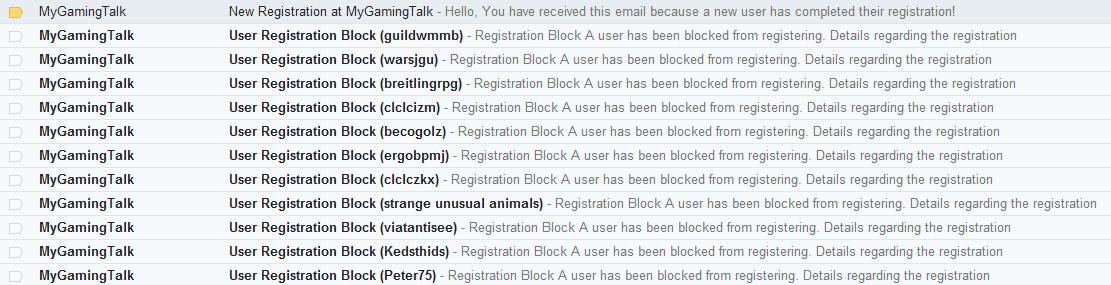
I am actually talking about mygamingtalk.com forum We use recaptcha since day one. I thought cloudfare would take care of the issue but it seems it didn't. Then I started using http://stopforumspam.com/ API and it's doing wonderful job. In 2 days, 53 spammers blocked.

-
Any admin facing spam issues on their forums? It seems spammers are going crazy lately on our forums. Just wondering if other admins running their clan forums are also experiencing same issue or not.
-
Worked fine on my test server for 2 days. I am about to deploy it on main servers once i reach 21 days uptime. 6:13:32 PM:> !uptime -------------------- F|A SILENT RECRUITING XPS uptime: 18 days 3 hours 23 minutes
-
Implemented Adrenaline Options
hellreturn replied to JvIasterMind's topic in Added / Completed Features
Wiki updated. Thanks for the report! http://mygamingtalk.com/wiki/index.php/Silent_Mod_Server_Cvar#Weapons.2C_Classes_and_Skills -
silent silEnT release 0.5.2 - server patch
hellreturn replied to TheSilencerPL's topic in Front Page News
Because their is no change in client side. Why would players need to download full client pk3 again for just 3 fixes? All those 3 fixes are server side. -
silent silEnT release 0.5.2 - server patch
hellreturn replied to TheSilencerPL's topic in Front Page News
Yes indeed you need patch because you had server files released before July 08, 2012. Admins downloading full package after July 08 don't need the patch. -
I have seen similar kind of bugs in other maps. I believe you should contact some map scripters and they should be able to fix your issue.